Product Description
Like the Asset? ☆☆☆☆☆
It would mean a lot to me, if you could leave a review.
It's the best way to help a creator grow.
Something not right?
Please don't hesitate to reach out, If you're not happy. ♡

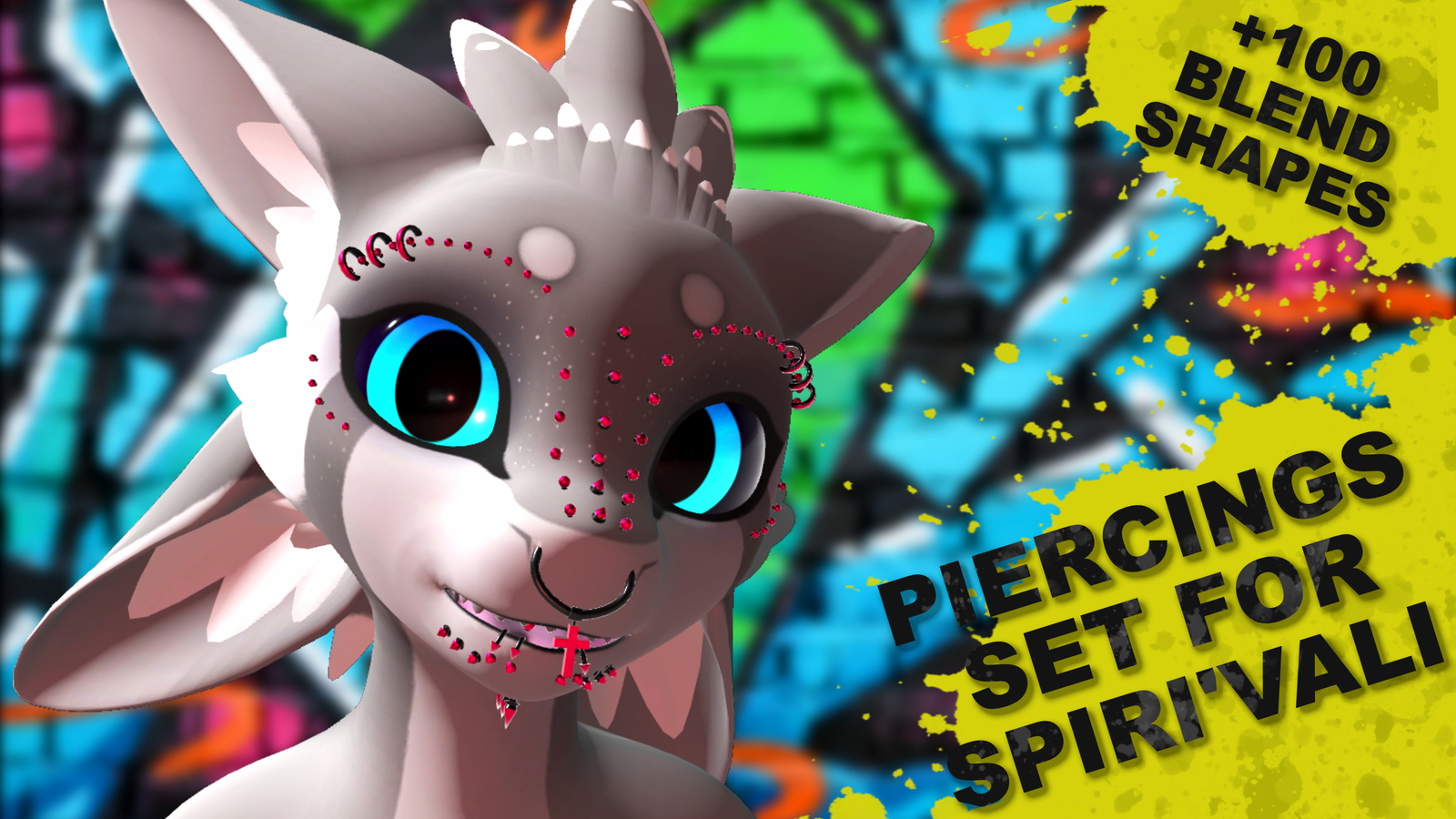
[Virtual Reality optimized Asset - Piercing Set Spiri'vali]
[Available Avatars]
🅯 - Spiri'vali
VRCFury is required for Face Tracking, Visemes, Gestures & MMD support.
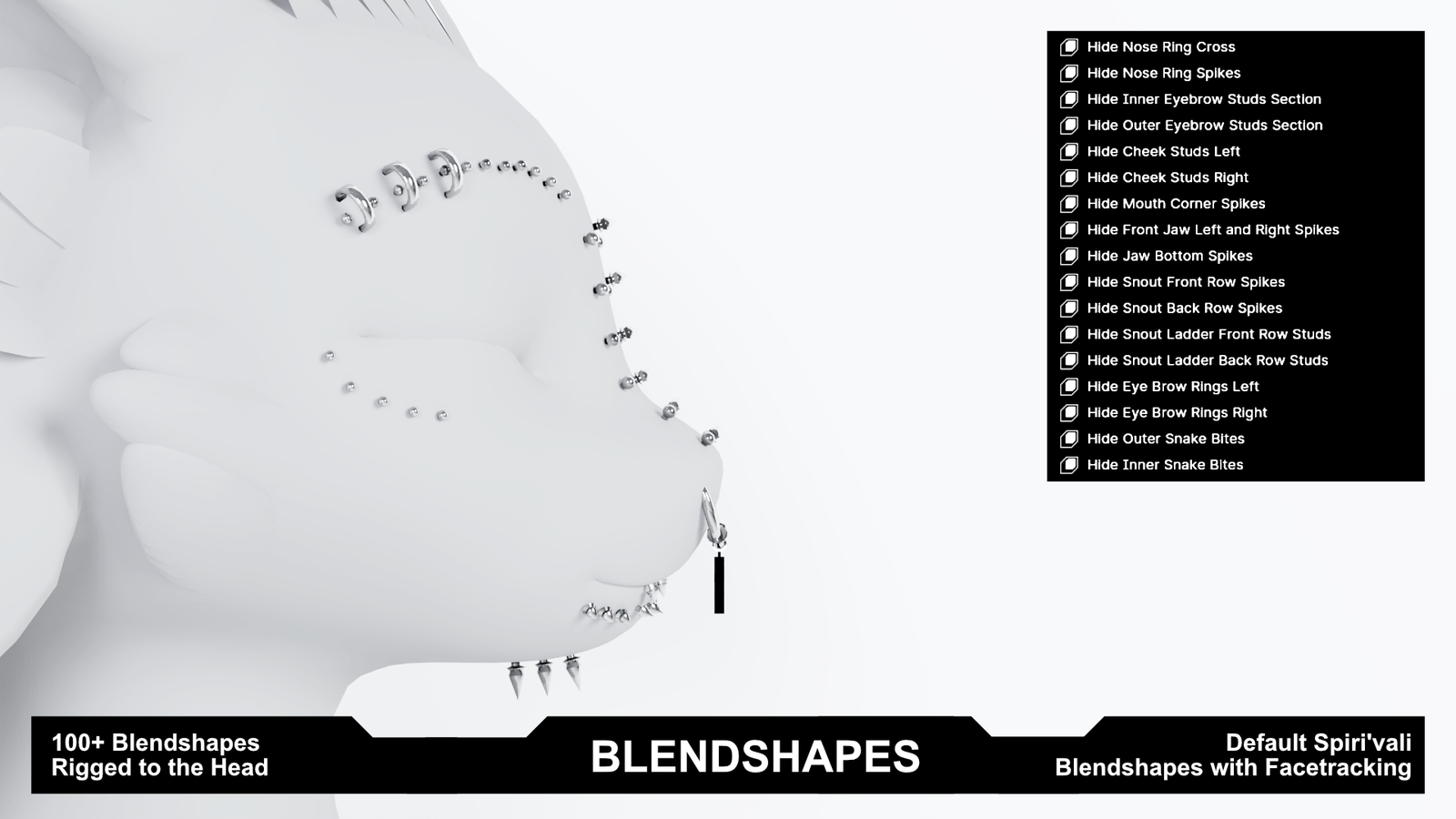
You can hide sections of the Piercing Set via BlendShapes.
See product pics for the full Hide- BlendShape list
Due to current limitations with VRCFury's Advanced Visemes driver,
some movements may appear slightly choppy in-game.
This is a platform-side limitation, not an issue with the model itself.
Merging the set to the avatar eliminates this entirely.
A video on how to to that is planned!

[Whats included?]
▦ - FBX file⁽ˢ⁾
❒ - Unity package
⌬ - Substance Painter File⁽ˢ⁾ [v7.4.1 ⇧]
🖌 - Photoshop File⁽ˢ⁾
🖹 - License Document
The set comes with 4 material variants:
Texture versions inside of Unity for PBS and Poiyomi:
◐ - Brushed Steel
◐ - Pure Gold
◐ - Pink Tips
◐ - Emission Scroll Effect w/ 2 Masks

[Specs]
△ - Vertex Count ~10,020
⚯ - Bone Count 35
◩ - Texture Resolution — 1K
◐ - Material Variants — 4
↦ - BlendShapes — 100+
ꜰᴀᴄᴇ ᴛʀᴀᴄᴋɪɴɢ · ᴠɪꜱᴇᴍᴇꜱ · ɢᴇꜱᴛᴜʀᴇꜱ · ᴍᴍᴅ
ʜɪᴅᴇ ʙʟᴇɴᴅꜱʜᴀᴘᴇꜱ > ꜱᴇᴇ ᴘɪᴄᴛᴜʀᴇꜱ

[How to setup?]
🛠 Install VRCFury via the Creator Companions repository.
🛠 Just click the VRCFury Button below for a guide.
- Open Creator Companion — Add the latest version to your project
- Import the Unity package into your project
- Install Poiyomi Toon Shader — available via the Poiyomi VPM or from the Poiyomi Discord
- Drag the prefab onto your avatar root
- Pick a material from the materials folder and drag it onto the model
- Adjust BlendShapes to taste. Can be found on the mesh itself.

[Support]
Please reach out if you experience any kind of Setup issues or clipping.
We want to continuously improve the products for everyone.
Also always happy to help!

[Licensing]
🖹 - Personal License PDF included with purchase.
✓ - Personal use — avatars, renders, prints, worlds
✓ - Modify freely — retexture, rerig, resize, combine
✓ - Commission work — client must hold the same license
✓ - Perpetual — does not expire
╳ - No resale or redistribution
╳ - No sharing as a kit, bundle, or stock
╳ - No commercial or on-demand use
╳ - Non-transferable
Content creator? Collabs welcome — Discord or [email protected]
Commercial use requires a separate inquiry.
[Attributions]
Music in the video:
Track: AbsoluteSound - Funky Funk 2
Music provided by NoCopyrightSounds.
Source: https://pixabay.com/music/funk-funky-funk-2-506959/
[Disclaimer]
⚠ - Pictures might differ from the Product.